telOS: Turning My PC Into a Local Cloud Gaming Console (Moonlight/Sunshine + a Rust Launcher)
Building telOS, a self-hosted cloud gaming console powered by Moonlight/Sunshine and a custom Tauri/Rust launcher, with an old Raspberry Pi as the handheld client.
🎮 telOS: Turning My PC Into a Local Cloud Gaming Console
Cloud gaming makes people think of GeForce Now or Xbox Cloud Gaming: someone else's server, a monthly subscription, and a library that isn't really yours. There's a much less known way to get the exact same feeling, streaming a game from one screen to another with almost no perceptible latency, by using your own PC as the server. The stack behind it is Moonlight/Sunshine, and it deserves way more attention than it gets.
I had an old Raspberry Pi doing nothing on a shelf, and a gaming PC doing nothing while I'm at work or in another room. That's the whole premise of telOS: turn the PC into a game-streaming host, and turn the Pi into a dumb but capable handheld client. On top of that stack, I'm building my own launcher in Rust so that "press A" is enough to jump into any game I own, regardless of which store it came from.
🧠 The Idea: Host Everything, Stream a Screen
The core principle is simple, and it's the opposite of most "streaming box" side projects: nothing about the game logic ever leaves the host PC.
- Sunshine runs on the gaming PC and streams its display and audio.
- Moonlight runs on the client (the Raspberry Pi, a phone, eventually a Fire TV Stick) and just displays that stream and forwards controller input back.
- telOS is the shell that runs on the host, registered as its own dedicated Sunshine application, not just "Desktop", so Moonlight lands directly on it.
┌────────── Host PC (Windows) ──────────┐      ┌─── Client ───┐
│  telOS ──launches──> Steam / .exe     │      │              │
│     └── display ──> Sunshine ─────────┼─────>│  Moonlight   │
│                  <──── controller ────┼──────┤              │
└────────────────────────────────────────┘      └──────────────┘
Because the UI isn't an app installed on the phone or the Pi, launching a game is a local, native action (spawning a process or firing a steam:// URI directly on the host) instead of depending on fragile Android deep-links or a remote API. The client stays dumb and interchangeable: today it's a Raspberry Pi, tomorrow it could be a Fire TV Stick, and nothing about the architecture has to change.
The goal isn't to stream one game nicely. It's to play every game I own, on every platform, from a handheld, including over a phone hotspot when I'm away from home, without a bloated, generic launcher getting in the way.
🕶️ Not a Dashboard, a Console
Most self-hosted game launchers end up looking like a Plex clone: a grid of posters, a search bar, a settings gear. It works, but it feels like browsing a media server that happens to have games in it, not like turning on a console.
telOS follows a short list of rules borrowed from picking apart real console UIs (PS4, PS5, Xbox, Switch, Wii, DS):
- The selected game is always the biggest object on screen.
- System and content never mix on the same visual layer.
- An overlay lets you check the connection or switch games without quitting.
- Recency beats a tidy folder structure. A "continue" rail should resolve most launches by itself.
Booting the shell plays a short glitchy boot sequence in monospace green on black (INITIALIZING telOS KERNEL..., BYPASSING SECURE BOOT..., MOUNTING VIRTUAL FILESYSTEM..., ESTABLISHING HANDSHAKE..., DECRYPTING PAYLOAD..., ACCESS GRANTED.) before it resolves into the logo. It's a wink at the whole premise: the host PC is treated as a system being "entered," not just an app being launched.
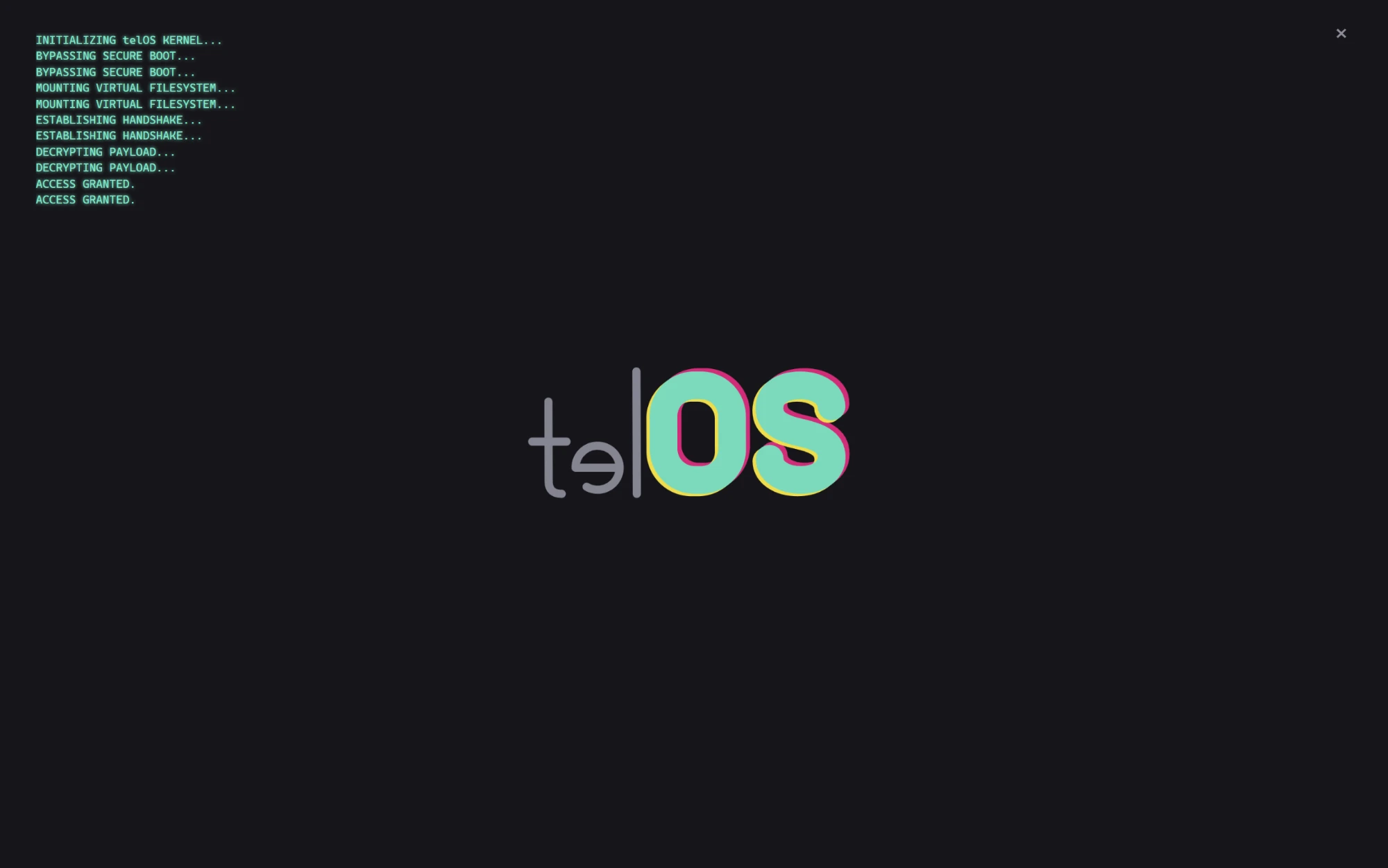
There's one hard technical constraint that shaped the whole visual language more than any mood board: this UI gets compressed through H.265 on a small screen, sometimes at 10 Mbps. That rules out fine text, subtle gradients (they band horribly over video compression), and 1px details. It forces flat colors, high contrast, bold type, big shapes, a constraint that turned into an actual aesthetic instead of a limitation.
🕹️ What's Actually Running Today
This is the part I'm the most excited about: telOS stopped being mockups a while ago. The shell reads the real game library on my machine, shows real cover art, and actually launches games, confirmed on Elden Ring, among others.
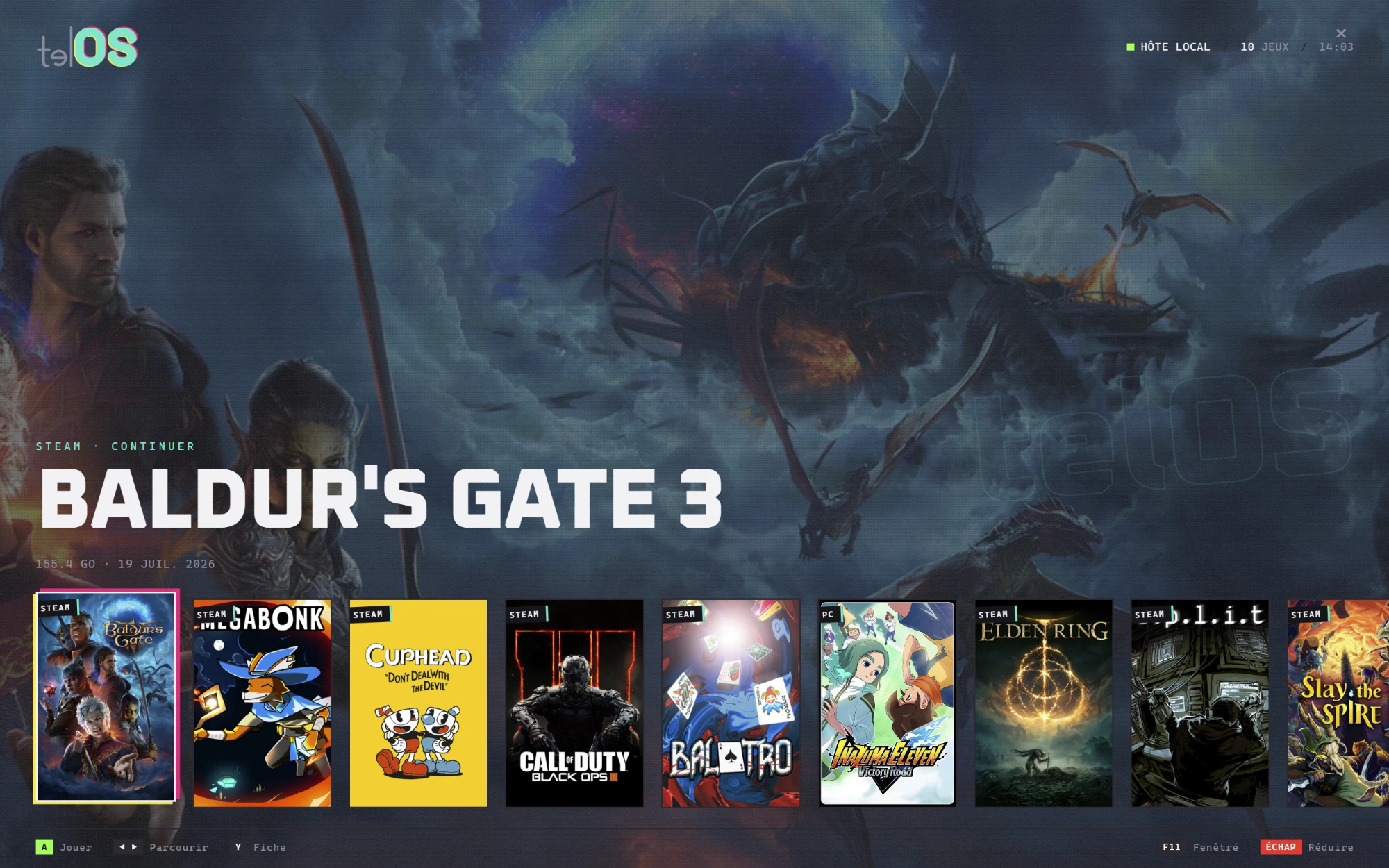
The main screen is a fullscreen hero: the selected game's key art fills the background, a status bar in the top corner shows HÔTE LOCAL (host online), the game count, and a clock, and the title sits large over a "continue" line pulled straight from Steam (STEAM · CONTINUER, size on disk, last played date). Underneath, a horizontal rail shows the rest of the library, each cover carrying a small platform badge stuck on at an angle, like a sticker, so a Steam game and a non-Steam one are never ambiguous.
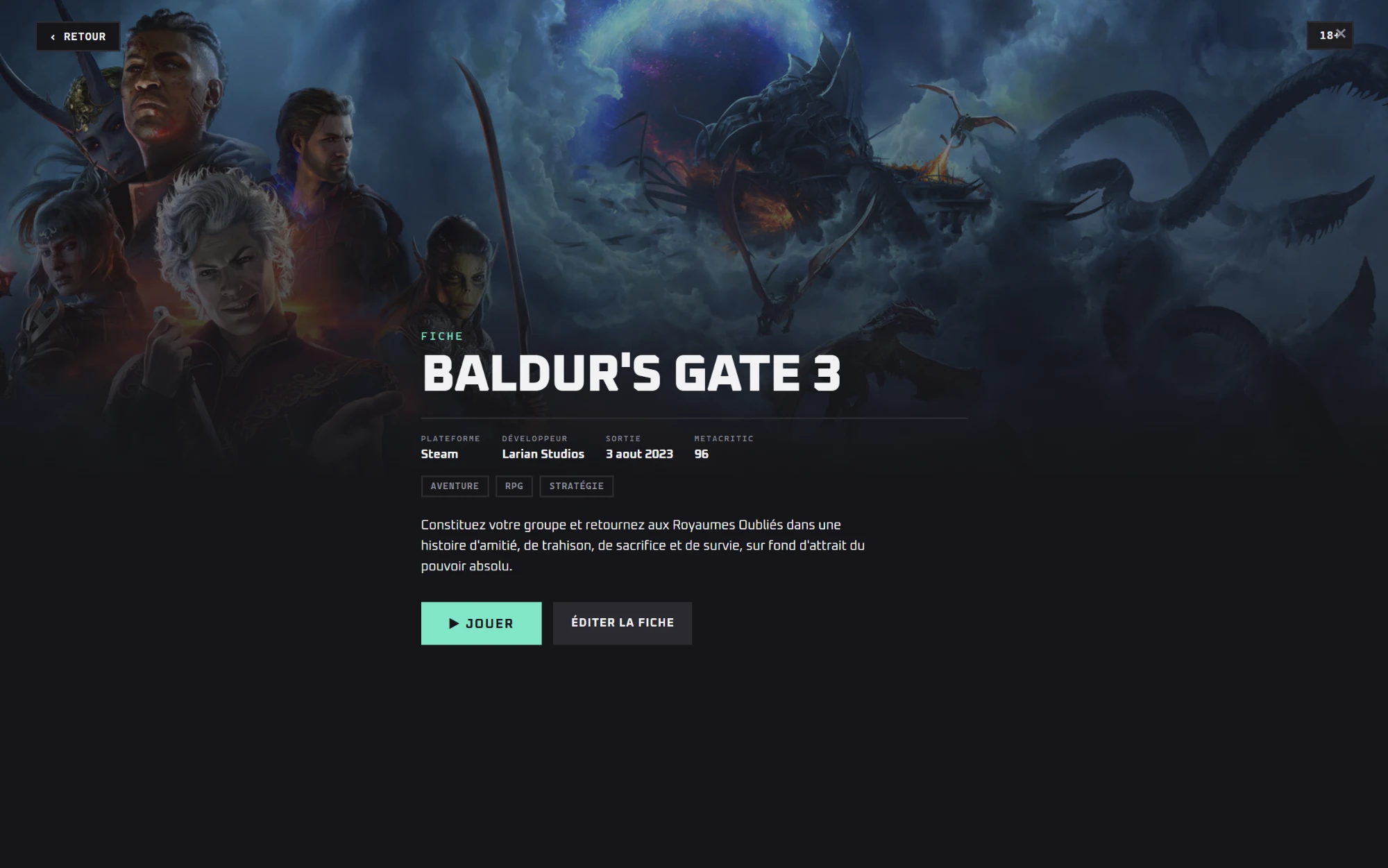
Pressing the info button opens a detail sheet over a blurred backdrop of the same key art: platform, developer, release date, an aggregate score, genre tags, a short synopsis, and two actions: play, or edit the entry. It's deliberately closer to a console's game page than to a spreadsheet row.
Under the hood, that's backed by:
- Real Steam scanning: a homemade VDF parser (no external dependency) finds Steam through the Windows registry, reads
libraryfolders.vdfand everyappmanifest_*.acf, sorts by recency, and pulls cover art from Steam's local cache. Redistributables, runtimes, and Proton compatibility layers get filtered out so they never show up as "games." - Multi-platform architecture from day one: every entry carries its source platform and its own launch URI. Adding Epic, EA, GOG, or Ubisoft later means dropping in one new platform file, not rewriting the core.
- Real launches, verified: the
steam://handler is registered on my machine, and the shell successfully spawns real games through it, not just a placeholder screen.
My own library today: 8 games on Steam (fully working), 1 on Ubisoft Connect, EA App installed, and an Xbox app with zero Game Pass titles, so Steam alone already covers most of my actual usage. Good sign that the "universal library" problem is smaller in practice than it sounds.
🗂️ Where the Game Info Comes From
The scan itself never touches the network. Boot never waits on HTTP, that's one of the hard rules the whole shell is built around. The detail sheet's developer, publisher, release date, genres, and score are a different story: enrichment data, fetched lazily only when you actually open a game's page, then cached to disk so it never asks twice.
Two sources, layered:
- Steam's own public appdetails endpoint for anything with a Steam appid. Free, no signup, no key.
- RAWG as the universal fallback for everything else (non-Steam games, emulated ROMs): a fuzzy search by name that also fills in a couple of fields Steam doesn't expose, like average playtime and age rating. It needs a free API key, sign up at rawg.io/apidocs.
Cover art follows the same "free source first, keyed fallback last" logic: Steam's CDN for Steam titles, the community-run libretro-thumbnails repo for well-named ROMs, and SteamGridDB as the last resort that catches everything else via fuzzy matching. It's the only piece that needs an account, sign up at steamgriddb.com.
Both keys live in a local, gitignored config file and never leave the machine or get committed to the repo, same rule as everything else telOS touches locally.
⚙️ Engine Choice: Tauri, Not Electron
Two constraints drove this decision: footprint and security posture.
- Footprint: Tauri uses the system WebView (WebView2, already on Windows 11) instead of shipping a full Chromium. Roughly 50 MB versus 150+ MB for the same UI in Electron.
- Security by default: the renderer is sandboxed and can only reach the OS through commands explicitly exposed one by one, behind a strict CSP with a Rust core. With Electron, getting to the same posture means manually hardening everything, and every forgotten spot is a hole.
- The trade-off: it requires the Rust toolchain, and the current Node-based prototype for scanning and launching has to eventually move into native Rust commands.
The UI itself is standard web tech, so it stays portable and doesn't depend on the native shell being finished first, which is exactly how I've built it so far: design and iterate in the browser against a small local dev server, then wire it into Tauri once the interface is settled.
A couple of rules I'm holding myself to while doing that: no native command gets exposed to the renderer unless it's strictly necessary, no executable path or argument is ever built from unvalidated input, and the scanned library plus the cover-art cache stay local-only data, never committed to the repo.
🗺️ Where It's Going
Roughly in order:
- Native core: scaffold the Tauri shell and move the library scanner from the Node prototype into Rust commands, with local persistence for settings and the library cache.
- Sunshine/Moonlight, for real: install and configure Sunshine on the host, register telOS as its own dedicated Sunshine app, validate a clean LAN round trip with real latency and bitrate numbers surfaced in the status bar instead of placeholders.
- Remote access: my phone hotspot sits behind CGNAT, so plain port forwarding is out. Tailscale is the plan to tunnel through cleanly, with adaptive bitrate to keep mobile data usage sane (streaming eats roughly 9 GB/hour at 20 Mbps).
- Small extras, evaluated honestly: a Spotify Web API integration for cover art and playback control is straightforward and well documented. Embedding Discord voice, on the other hand, has no official third-party API; the only unofficial route (automating the client with a user token) breaks Discord's terms and risks the account, so that's off the table. Since telOS runs on the same PC as everything else, the simpler and honest answer is to just show the real Discord client as an overlay, plus the official Rich Presence SDK to broadcast "playing Elden Ring" from telOS itself.
- More clients: the host/client split means a Fire TV Stick is just another Moonlight client, no new architecture required. The catch is the Fire TV remote only has a D-pad and two buttons, so navigation has to work with that minimum, even though actually playing still needs a real controller.
🧩 The Raspberry Pi's New Job
The Pi that used to sit idle on a shelf is becoming the handheld client: Moonlight installed, pointed at the host's Sunshine instance, and nothing else running on it. It doesn't need to be powerful. Decoding an H.265 stream is cheap compared to actually rendering the game, which is exactly the point of doing cloud gaming locally: all the heavy lifting stays on the PC that already has the GPU.
The shell already runs and launches real games; the native Tauri core and the Sunshine/Moonlight wiring are the next real milestones. I'll follow up once the Raspberry Pi is streaming its first game end to end.